
Most business websites treat the submit button as the finish line. The visitor completes a form, a notification goes somewhere, and the page displays a thank-you message. For the customer, however, that is only the start. They still need an answer, an estimate, an appointment, an approval request, a payment link, or a useful update.
The operational question is not simply whether the form worked. It is whether the business can turn that submission into a clear customer conversation without losing the reason the person reached out.
What Usually Happens After A Form Submit
A typical form sends an email to one or more people. Someone reads it, decides who should respond, opens another system to find the related record, and then contacts the customer from a separate email or messaging tool. If the customer replies later, the reply may arrive in a shared inbox, on a different phone, or inside a dashboard that does not show the original work.
Every handoff creates a small context gap. Staff must remember which request the person submitted, what was promised, who owns the next step, and whether anything has already been sent. That may be manageable at low volume. It becomes much harder when several people are handling leads, jobs, schedules, invoices, and customer updates at the same time.
A successful form submission is not the same as a successful customer handoff. The handoff is complete only when the request has an owner, a response path, and enough context for the next person to act.
Why The Conversation Gets Lost
The problem is usually not a missing tool. It is a broken connection between tools. The form knows what the customer requested. The job system knows what work is being performed. The invoice system knows what is owed. The messaging inbox knows that a reply arrived. When those facts live in separate places, the operator must rebuild the story before responding.
Common warning signs include:
- Form notifications are forwarded manually to decide who should respond.
- Customer replies arrive without the related job, quote, or invoice visible.
- Two people answer the same request because ownership is unclear.
- No one can quickly see how long an inquiry has been waiting.
- A failed message or missed reply is discovered only after the customer follows up again.
A shared inbox can centralize messages, but centralization alone does not create workflow context. The message still needs to remain attached to the business event that made it necessary.
Keep The Next Action Attached To The Work
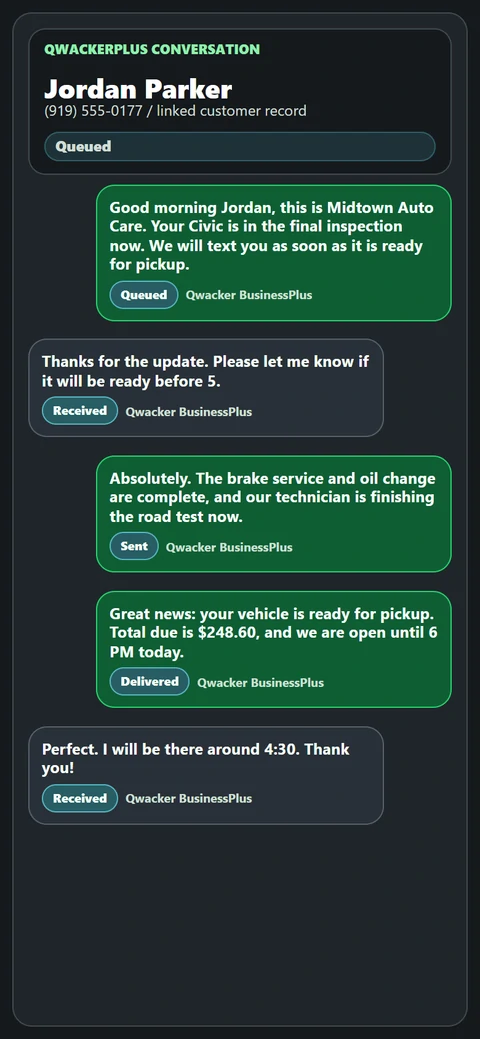
Workflow messaging treats the customer conversation as part of the operating record. A website request begins a defined path. The request is associated with the correct customer or work item, the first response is sent from that context, and later replies return to the same path so the operator can see what the conversation belongs to.
This does not mean every message should be automated. It means the business should know which parts are routine, which need a person, and where the complete thread should remain visible. A prepared confirmation can set expectations immediately. A person can take over when the question needs judgment. The useful outcome is continuity, not automation for its own sake.
Four Everyday Examples
Quote Requests
A customer requests an estimate. The response path should retain the requested service, contact details, assignment, and every follow-up needed to move the quote forward.
Appointments
A scheduling form should lead into confirmation, changes, arrival updates, and replies without forcing staff to reconstruct the appointment from separate messages.
Approvals And Invoices
An approval request or payment link is easier to act on when the message and customer response remain tied to the exact work record that triggered it.
Service Follow-Up
Closeout updates and review requests work best when timing, customer history, and the completed job remain visible in the same operating path.
Forms, Chatbots, And Inboxes Have Different Jobs
A form is useful for structured intake. A hosted chatbot can conduct a two-way SMS conversation for supported configurations, with human takeover available when direct attention is needed. Guided Chat Assistants can help a person collect lead information with prepared questions and suggested replies. An inbox can provide a place to read messages.
Those surfaces should not be treated as interchangeable. The important design decision is how each one hands useful context into the next business action. A form should not become an isolated notification. A chatbot conversation should not hide the point where a person takes over. An inbox should not require the operator to search another system to understand what the customer means.
Start With One Workflow
The cleanest first implementation is usually the customer path that already creates repeated manual work. Choose one form and follow what happens from the moment it is submitted until the customer receives a useful response and the business completes the next action.
- Name the trigger. Identify the exact form, status change, invoice event, or approval need that begins the conversation.
- Define ownership. Decide who is responsible for the first response and what happens when that person is unavailable.
- Preserve context. Keep the customer, request, related record, message history, and current status visible together.
- Test both directions. Confirm the outbound message and the customer reply return to the expected operating path.
- Measure the handoff. Watch response time, unread replies, failed sends, and the number of manual steps required to finish the workflow.
Once one path is dependable, the same operating pattern can be applied to another form or customer moment. That is safer and easier to evaluate than attempting to connect every website action at once.
Put The Guide To Work
Map The First Customer Conversation
See how Qwacker keeps messaging attached to the work, review common solution paths, or send the team one real form-to-follow-up workflow to map.